Showing posts with label Customization. Show all posts

Saturday, July 19, 2008

Charamel Best Firefox & Thunderbird Theme

I try and check out all the themes for Firefox and Thunderbird that I can, however only one has ever really impressed me. That theme is Charamel.

Charamel Firefox and Thunderbird Theme

This theme has had a lot of work put into it and it’s absolutely beautiful. Everything works together and it’s a joy to use. There are even elements in Thunderbird that appear as if their overlapping other parts of the design and it’s great. Not only is this very sweet eye candy, it’s also been designed to work better than the original theme I believe.

If you are in the market for an excellent Firefox or Thunderbird theme, check out Charamel. By far, it’s the best theme I’ve found.


http://members.shaw.ca/lucx/

Thursday, July 17, 2008

UX Theme patcher for Vista

With this simple application you can easily patch your Windows Vista system to use custom styles. Similar to the UxTheme patch for Windows XP. After that you can modify your Aero style to use the glass transparency effect on maximized windows.

Get it Here

FireFox 3d Tab Effect


This Addon for Firefox give you a “cube Effect” when switching between tabs

Download It here


FlyakiteOSX v3.5

FlyakiteOSX v3.5

FlyakiteOSX is a transformation pack. It will transform the look of an ordinary Windows XP+ system to resemble the look of Mac OS X. The installer simply automates the process of replacing critical system files, setting registry tweaks, and installing extras such as cursors, sounds, visual styles, etc.

In case you are not happy with the results of FlyakiteOSX, everything is completely removable. Just run the uninstaller from the Start Menu or from Add/Remove Programs.

FlyakiteOSX does not contain any spyware or ad-ware of any kind. All files needed for FlyakiteOSX are stored in the Windows directory in a folder named ‘FlyakiteOSX’ that is hidden by default. All registry values for FlyakiteOSX are written to HKEY_LOCAL_MACHINE\Software\FlyakiteOSX.

Developer : Chris Kite
Version : 3.5

Download [30.2MB]

Saturday, July 12, 2008

vista osx transformation pack

Download


Before starting the installation you have to disable UAC. After the Installation you can turn it on again. The reason for this is, that vista doesn�t allow programs to modify system files automatically, even as an administrator. Starting the setup without disableing UAC will have irreparable damages.

If you don�t know how to disable, follow the steps in this picture.


Uninstaller:

Rapidshare.com (USA)


Mirrors:

Rapidshare.com (USA)

Uploaded.to (USA)

MediaFire (USA)

MegaUpload (USA)

Mihd.net


Downloads: 302289

Thursday, July 10, 2008

make ubuntu 3d and use 3d glasses made at home

For those using Ubuntu 8.04 Hardy Heron default compiz or compiz --version > 0.6.* this guide should not be used.

For those who are using Ubuntu 7.10 Gutsy Gibbon and would like to have 3D Windows, Atlantis2, Snow, Stars, Atlantis, Screensaver, Anaglyph, Wallpaper, Tile, Freewins, Fireflies, Photowheel and Snowglobe working with Gutsy's default compiz-fusion, I am presenting this guide. Installing Mouse position polling, Magnifier and Show mouse is slightly different and are listed in the section Even More Plugins. To see what each plugin does, search YouTube.

This is not recommend to anyone not knowing exactly what they are doing.

This tutorial assumes that:
1) You have a fresh install of Gutsy.
2) You already have Gutsy's default compiz working (0.6.*).
3) You are running as user and not root.

NOTE: Compiz-Fusion is installed by default in Ubuntu Gutsy and will work as long as you have a video card with appropriate drivers installed and properly configured. Installing drivers is beyond the scope of this tutorial, but there are plenty of guides to configure your graphics card on Gutsy; see the Hardware page on the Compiz Fusion Wiki for more information, or the irc channel at the bottom of this guide.

Getting the build dependencies
Install the packages required for compiling plugins:
Code:

sudo apt-get install compiz-bcop compiz-dev build-essential libxcomposite-dev libpng12-dev libsm-dev libxrandr-dev libxdamage-dev libxinerama-dev libstartup-notification0-dev libgconf2-dev librsvg2-dev libdbus-1-dev libdbus-glib-1-dev libgnome-desktop-dev x11proto-scrnsaver-dev libxss-dev libxslt1-dev libtool

Getting the plugin source tarballs
Create a subdirectory for the code in your home directory:
Code:

mkdir -p ~/compiz/

Use the following commands to download the plugins you want to install:
wget -O /tmp/anaglyph.tar.gz 'http://oreaus.googlepages.com/anaglyphz.tar.gz'


Extracting the source code

Example: For 3D plugin, you would do this:
Code:

tar -xf '/tmp/anaglyphz.tar.gz' -C ~/compiz/


Once you are in the directory, you can compile the plugin:

Code:

make
make install

After compiling
Restart compiz and ccsm.


Removing a plugin
If for any reason you want to uninstall a plugin, the following command can be used.
Code:

make uninstall


make free 3d glasses at home


Make 3D Picture Glasses Fast And Easy! - For more of the funniest videos, click here

Introducing the real 3D Compiz!

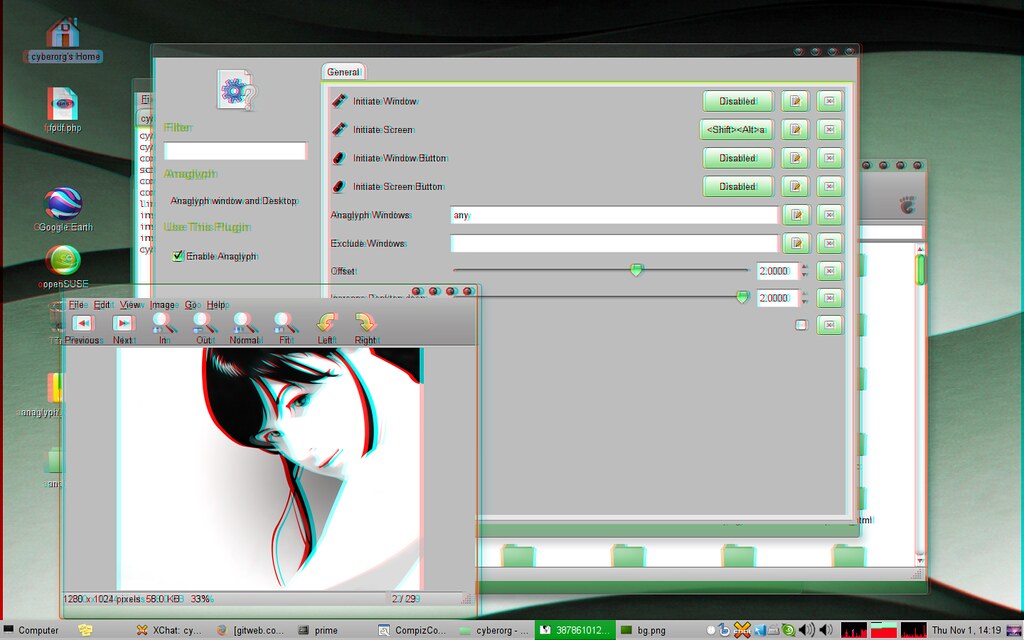
Wodor has hacked together an anaglyph plugin for Compiz that turns ordinary monitor into a real 3D one. The blurry image you see below is an anaglyph rendered by the plugin, you need 3D glasses or use anything transparent red (left eye) and cyan(right eye) to view the magic.click to enlarge

Click the image to view it enlarged, you should see desktop icons drop back and windows floating in air.

Although I do not think that people would be wearing funny glasses all day long to work on their PC, possibilities this plugin presents are quite exciting for gamers and everyone wanting to show off the ‘real’ 3D desktop.

The plugin is in testing/unstable/unsupported home:cyberorg git repository.


Edit: Few more images and source tarball here: http://wodor.org/anaglyph/


Convert your Pocket PC into the iPhone!

Get the iPhone Theme for Pocket PC! BEST DEAL ON THE NET!
xv6700 iPhone Theme My iPhone Theme

iPhone Theme for Pocket PC

!! NEW VERSION RELEASED !! - March 21, 2008

Official PayPal Seal

!! ENDS TONIGHT !!
HUGE SLASH!!
WAS 20.00 USD

NOW 10.00 USD


Within 30 Minutes you can start experiencing the iPhone on your Pocket PC!
Unbelievable? Its Very True! Read on...

About

The iPhone theme was designed for your pocket pc so you can have all the great features of the iPhone along with all the window applications. You now can have the best of both worlds all in your pocket pc! The iPhone theme was designed to give you the feel of an iPhone including the look, touch and the excitement just as if you were to purchase the iPhone. Now you do not have to switch to a carrier that has the iPhone, just download the theme and Walla, you have your own iPhone custom around your needs!

Once you have completely installed the iPhone theme, be prepared to show off your custom version of the iPhone to your friends and family! You then can show off your phone stating you have saved 300 dollars and hassle free of getting the new iPhone.

The iPhone Theme package will give you the directions for all the installations needed on how to install the iPhone Theme. It should not take you more than 30 minutes to successfully install the complete package. We have also provided installation videos on our How To Video page

Watch a video iPhone Theme Demonstration here!


Features (Just like the iPhone)

  • iPhone Phone Lock Slider
  • iPhone Icons
  • iPhone Dial Pad
  • iPhone Calculator
  • iPhone Weather
  • iPhone Sounds
  • iPhone Music Player & Alarms
  • and much much more...

Requirements

  • Operating System: Windows Mobile v5.0 or Windows Mobile 6.0
  • Screen: QVGA (240 x 320) or SQVGA (240 x 240) or VGA (640 x 480)
  • Registration: Wisbar advance & Wisbar desktop

NOT COMPATIBLE

  • Operating System: Windows Mobile 2003 or under
  • Programs: Video Call, Smart dialer and other dialers

Purchase

Here at MyiPhoneTheme.com we offer one of the best iPhone Themes found on the internet. All of our competitors with "Alike" iPhone Themes are charging people 20 to 30 USD. Like their purpose, our purpose is not to get rich but only enough to support our site and our product. Below we support 3 different platforms for your pocket pc, please select the type of pocket pc you have and click the image to purchase it. The only difference is the screen sizes, between SQVGA, QVGA and VGA, these are all pocket PC Standards. The VGA screen size is 640 x 460, QVGA size is 320 x 240 and the SQVGA is 240 x 240.

!! HUGE SALE !!
ENDS TONIGHT
WAS 20.00 USD

NOW 10.00 USD


For immediate retrieval of your Download Code, wait at least 5 minutes after your transaction then Click Here